

























[Home][9. Duplicated Documents][9.3 Parameters]
9.3 Parameters
The NeuralFilter Matching will be used to retrieve duplicated Documents; there are five steps:
-
Parameters
-
Signatures
-
Training
-
Matching
-
Analysis
The ImageFinder has many parameters. Changing these parameters will change the output of the computations. The Parameters are set by clicking the Parameter button, which will open the Parameter Window in Figure 7.2. You will adjust the ImageFinder parameters here.
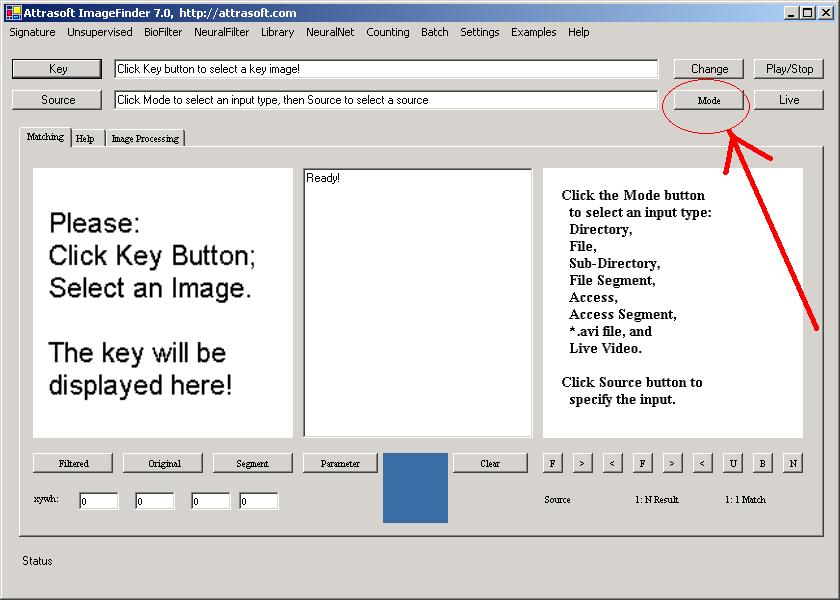
Figure 9.7 Set the Input Mode as “Sub Dir”, Sub-directory Input. Click the Mode button until you see “Sub Dir”.
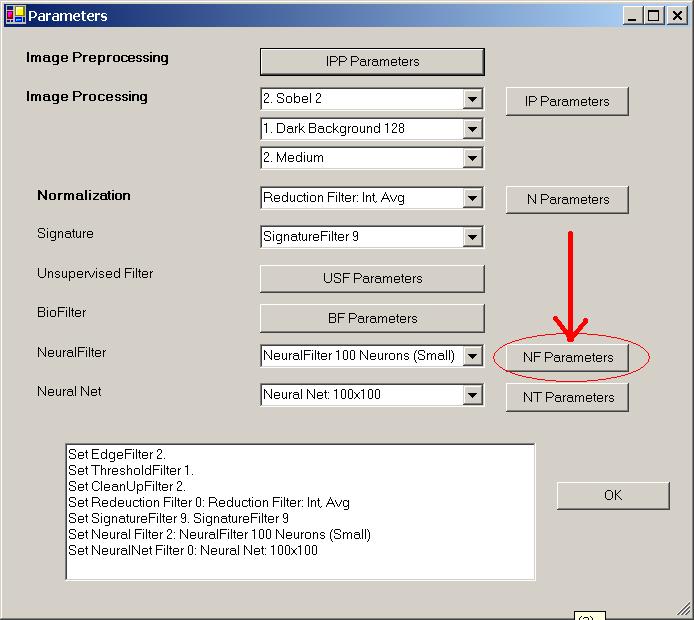
Figure 9.8 Parameters for the Neural Filter.
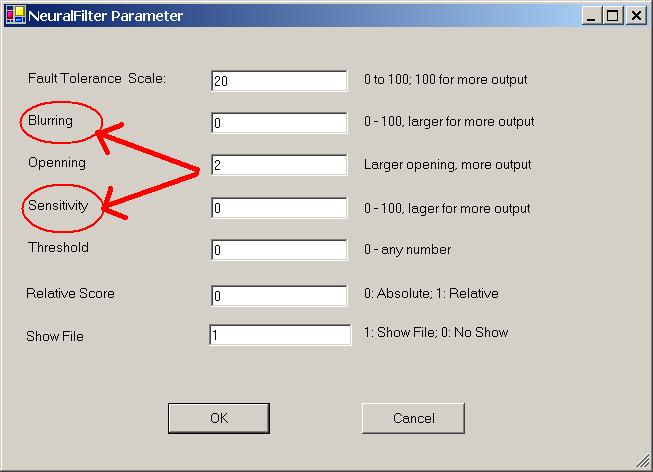
Figure 9.9 Neural Filter parameters, Blurring, & Sensitivity.
We will set several parameters in this chapter:
-
Signature Filter = “Signature Filter 9” (See Figure 8.1)
-
Input Mode = “Sub Dir” (See Figure 9.7)
-
Blurring = 0 (See Figure 9.8, 9.9)
-
Sensitivity = 0 (See Figure 9.8, 9.9)
Setting:
-
The Signature Filter will be set to “Signature Filter 9” (See Figure 8.1).
-
The input mode will be the sub-directory input, i.e. the ImageFinder will find the signature from all sub-folders of a specified folder. Click the Mode button until you see “Sub Dir” in Figure 9.7.
-
Click the Neural Filter parameter button in Figure 9.8, you will get Figure 9.9. Set both Blurring and Sensitivity to 0 in Figure 9.9.

[Home][About][1. Introduction][2. Overview][3. GUI][4. Image Signatures][5. Unsupervised Filters][6. Results & Analysis][7. BioFilters][8. NeuralFilters][9. Duplicated Documents][10. Face Recognition][11. Auto Part Recognition][12. Dynamic Library][13. NeuralNet Filter][14. Segment Variation][15. TV Advertisements][16. Counting & Tracking][17. Image PreProcessing][18. Image Processing][19. Batch Job][20. Parameters][21. Input Option][22. Application Developers][23. Reference Manual][24. Support Services][25. Readme.txt]
Copyright (c) 1998 - 2006 Attrasoft, Inc. All rights reserved.