


























[Home][21. Input Option][21.7 Live Video to Images]
21.7 Converting Live Video to Images
You will need a Logitech camera for this section.
After starting the camera live, the ImageFinder will convert the live video file to a set of images. After that, they are the same as the rest of the images.
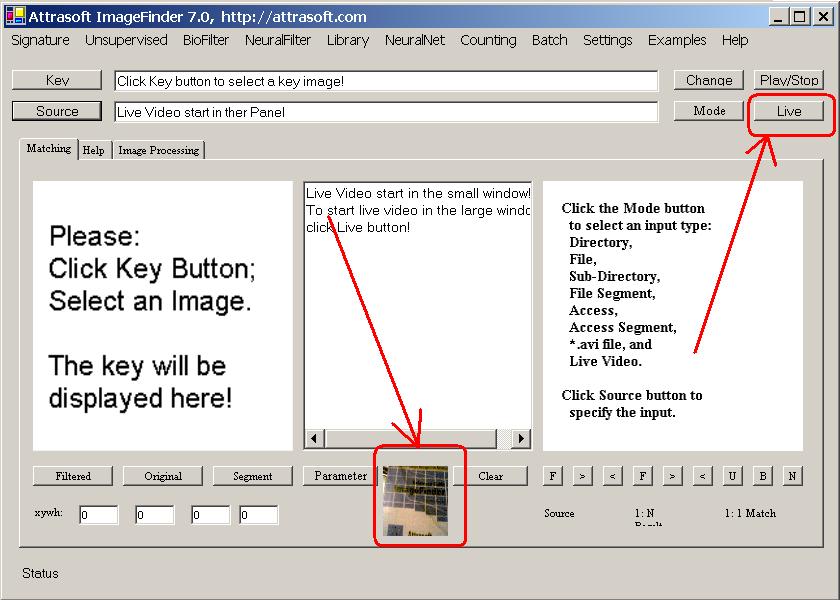
Figure 21.7 Converting Live Video File to Images, before clicking the “Live” button.
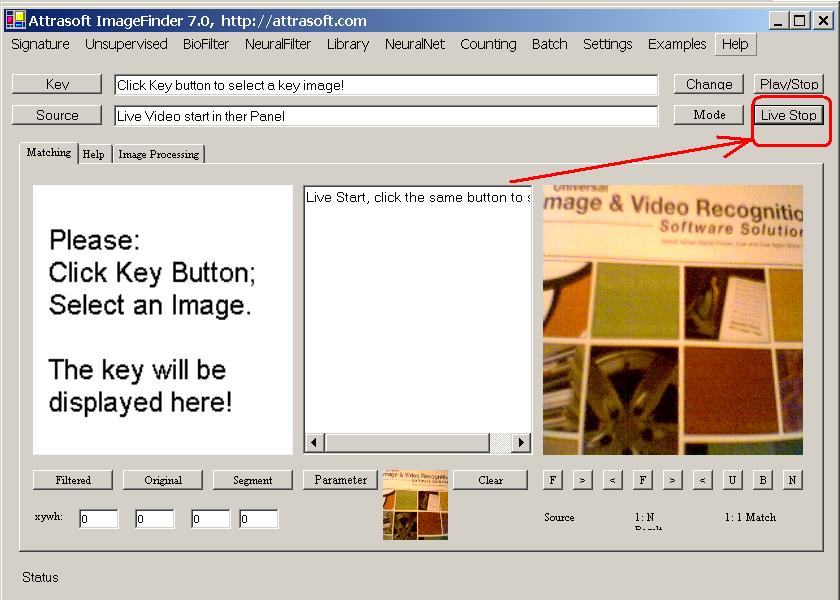
Figure 21.8 Converting Live Video File to Images, after clicking the “Live” button.
Example. Converting Live Video:
-
Start the software;
-
Select the option, “Live Video”;
-
Click the Source Button to get Figure 21.7, where live video is shown on a small window on Figure 21.7;
-
Click the Live Button on 21.7 to get Figure 21.8.
-
Click the “Change” button in Figure 21.7 to get Figure 21.8;
-
Click the “Live to Images” button in get Figure 21.6 to convert the Live Video to images;
-
Click the “Live Stop” button in Figure 21.8 to stop.

[Home][About][1. Introduction][2. Overview][3. GUI][4. Image Signatures][5. Unsupervised Filters][6. Results & Analysis][7. BioFilters][8. NeuralFilters][9. Duplicated Documents][10. Face Recognition][11. Auto Part Recognition][12. Dynamic Library][13. NeuralNet Filter][14. Segment Variation][15. TV Advertisements][16. Counting & Tracking][17. Image PreProcessing][18. Image Processing][19. Batch Job][20. Parameters][21. Input Option][22. Application Developers][23. Reference Manual][24. Support Services][25. Readme.txt]
Copyright (c) 1998 - 2006 Attrasoft, Inc. All rights reserved.