

























21.3 File Segment Input
The first three options are for whole images.
If you want compute the signature for a segment of an image, you have to select File Segment Input.
The Input Files must list one image per line. Each line specifies an absolute path, Image_ID, x, y, w, and h. A sample segment file looks like this:
.\2067(1).jpg 1 20 20 280 200
.\2067(2).jpg 2 20 20 280 200
.\2067(3).jpg 3 20 20 280 200
.\2067(4).jpg 4 20 20 280 200
.\2071(1).jpg 5 20 20 280 200
.\2071(2).jpg 6 20 20 280 200
.\2071(3).jpg 7 20 20 280 200
Here (x, y, w, h) are in the unit of pixels. You can specify File Segment source either in Figure 21.1, or in Figure 21.2:
-
In Figure 21.1, select the �File Segment�.
-
In Figure 21.2, keep clicking the Mode button and the setting will switch from one to the next.
Example. File Segment Input:
-
Start the software;
-
Select Option, �File Segment�;
-
Click the Source Button, and select file, �.\input_file\input_filesegment1.txt�;
-
Click the �F� button in Figure 21.3 to see the first image, and click the �>� button to see the next image.
-
The segment is marked by a box in Figure 21.4.
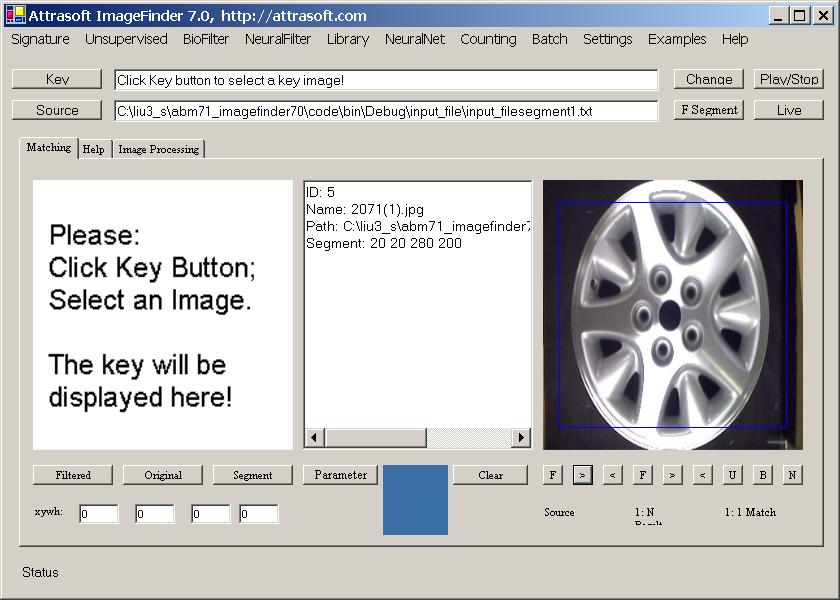
Figure 21.4 File Segment.

Copyright (c) 1998 - 2006 Attrasoft, Inc. All rights reserved.