

























[Home][21. Input Option][21.1 File Input]
21.1 File Input
You can specify the search source with a file. The Input Files must list one image per line. Each line specifies an absolute path. For example,
C:\xyz1\0001.jpg
C:\xyz1\0002.jpg
C:\xyz2\0003.jpg
C:\xyz2\0004.jpg
�
The only difference between the Directory Input and the File Input is how images are entered into the ImageFinder; after that, all other steps are the same.
You can specify File Input either in Figure 21.1, or in Figure 21.2.
-
In Figure 21.1, select the second option for File Input.
-
In Figure 21.2, keep clicking the Mode button and the setting will switch from one to the next.
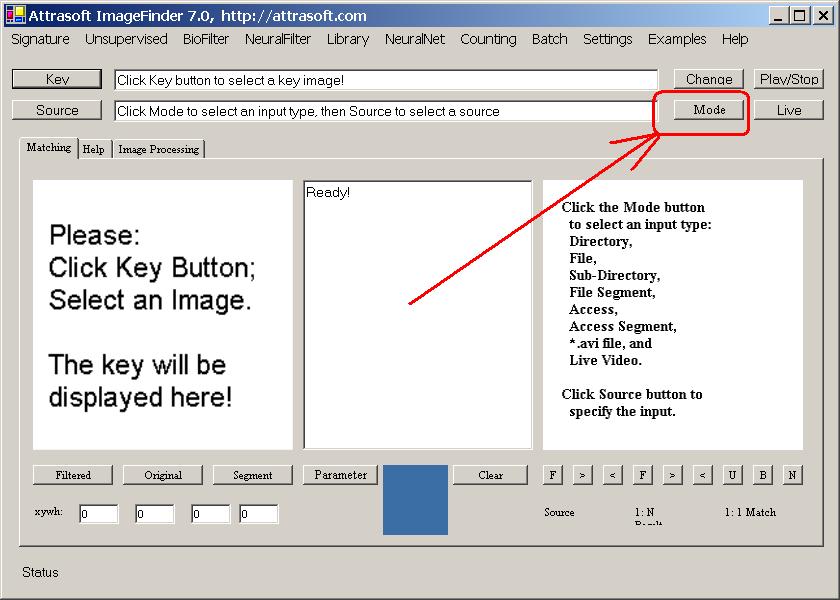
Figure 21.2 Input Mode Button.
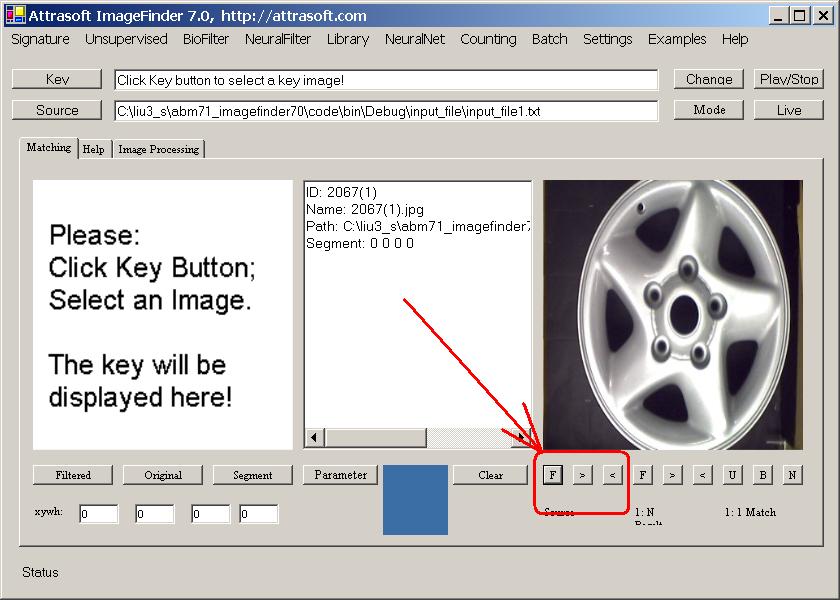
Figure 21.3 File Input example.
Example. File Input
-
Start the software;
-
Select option, �Search File�;
-
Click the Source Button, and select file, �.\input_file\input_file1.txt�;
-
Click the �F� button in Figure 21.3 to see the first image, and click the �>� button to see the next image.

[Home][About][1. Introduction][2. Overview][3. GUI][4. Image Signatures][5. Unsupervised Filters][6. Results & Analysis][7. BioFilters][8. NeuralFilters][9. Duplicated Documents][10. Face Recognition][11. Auto Part Recognition][12. Dynamic Library][13. NeuralNet Filter][14. Segment Variation][15. TV Advertisements][16. Counting & Tracking][17. Image PreProcessing][18. Image Processing][19. Batch Job][20. Parameters][21. Input Option][22. Application Developers][23. Reference Manual][24. Support Services][25. Readme.txt]
Copyright (c) 1998 - 2006 Attrasoft, Inc. All rights reserved.