

























20.2 Image Preprocessing
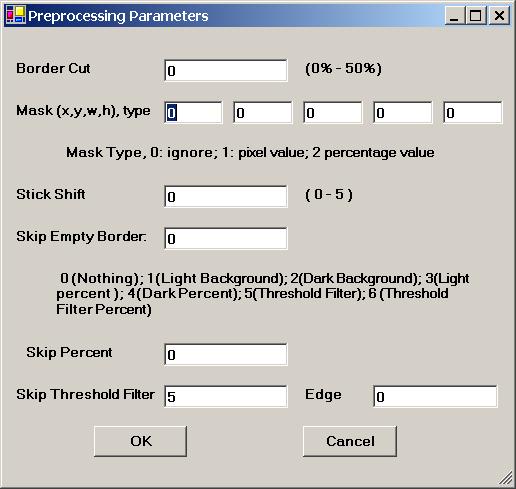
Figure 20.2 Image Preprocessing.
Border Cut
Use the �Border Cut� parameter to cut the border areas. Enter N to the first textbox in Figure 20.2, then N% near the border will be cut off.
Mask
Use the �Mask� parameter to impose a mask on the input images. Enter (x, y, w, h, 2) to the second row in Figure 20.2; then a mask in percent value will be imposed on the input images. Enter (x, y, w, h, 1) to the second row in Figure 20.2; then a mask in pixel value will be imposed on the input images.
Stick Shift
Use the �Stick Shift� parameter to speed up the computation. Set �Stick Shift� in Figure 20.2 between 0 and 5, with 0 being the slowest and 5 being the fastest.
Skip Empty Board
Skip Percent
Skip Threshold Filter
Skip Edge Filter
Use these parameters to skip the border area by cutting off N% percent of the contents.
The �Skip Empty Border� parameter in Figure 20.2 specifies the type:
0 No skip;
1 Skip the white empty border space;
2 Skip the black empty border space;
3 Skip x percent of the contents on the white background space;
4 Skip x percent of the contents on the black background space;
5 Skip empty border space on user defined Threshold Filter;
6 Skip x percent of the contents on user defined Threshold/Edge Filters.
Use the �Skip Percent� parameter to specify the percentage of content you want to cut off for Options 3, 4, and 6.
Options 1, 2, and 5 use the default setting, which is 2%. Use the �Skip Threshold Filter� and �Skip Edge Filter� to set the Edge Filter and Threshold Filter, respectively.

Copyright (c) 1998 - 2006 Attrasoft, Inc. All rights reserved.