


























19.4 Batch Execution Code
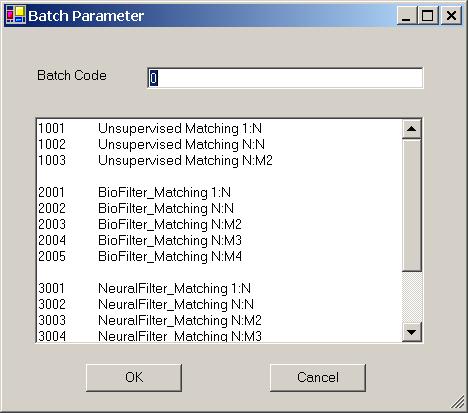
Figure 19.2 Execution Code Window.
There are many commands in the ImageFinder. Each command has an integer for identification. This integer is called Batch Execution Code. The �Batch/Run� command uses this code to run the command specified by the batch file.
To find the batch code for each command, click:
Batch/Set Execution Code
You will see a textbox and the following codes:
1001 Unsupervised Matching 1:N
1002 Unsupervised Matching N:N
1003 Unsupervised Matching N:M2
2001 BioFilter_Matching 1:N
2002 BioFilter_Matching N:N
2003 BioFilter_Matching N:M2
2004 BioFilter_Matching N:M3
2005 BioFilter_Matching N:M4
3001 NeuralFilter_Matching 1:N
3002 NeuralFilter_Matching N:N
3003 NeuralFilter_Matching N:M2
3004 NeuralFilter_Matching N:M3
3005 NeuralFilter_Matching N:M4
4001 NeuralNet_Matching 1:N
4002 NeuralNet_Matching N:N
The current batch code is the code of the last run. When the software started, the current batch code is 1001. To change it:
-
Click Batch/Set Execution Code;
-
Enter the Batch Execution Code to the text box and click the OK button.
You can also make changes directly in the batch files. The batch files are abm60.txt, abm60_2.txt, abm60_3.txt, abm60_4.txt, abm60_5.txt.

Copyright (c) 1998 - 2006 Attrasoft, Inc. All rights reserved.