

























[Home][14. Segment Variation][14.1 Parameters]
14.1 Neural Net Parameters
In this chapter, we will need to set up the Neural Net Parameters. To set the parameters, click the Parameter button and you will see Figure 14.1. In Figure 14.1, click the �NT (NeuralNet) Parameter� button; you will see Figure 14.2. You will set the parameters in Figure 14.2.
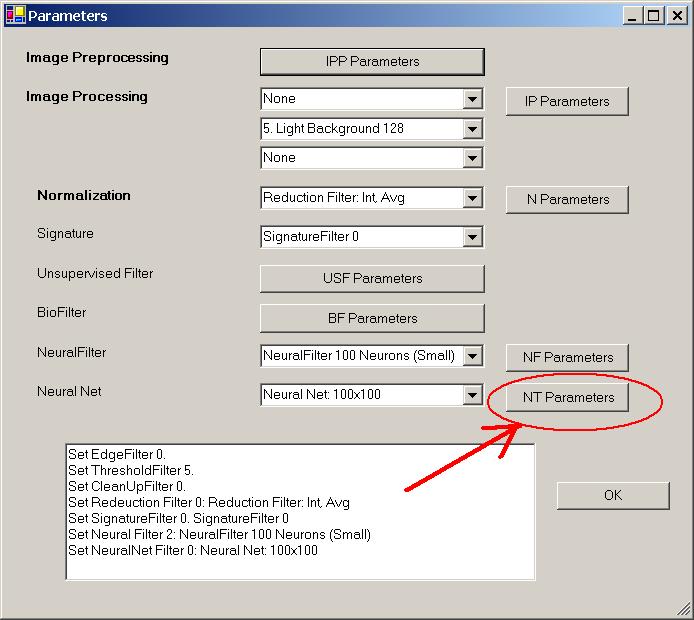
Figure 14.1 Setting up the Neural Net Parameters.
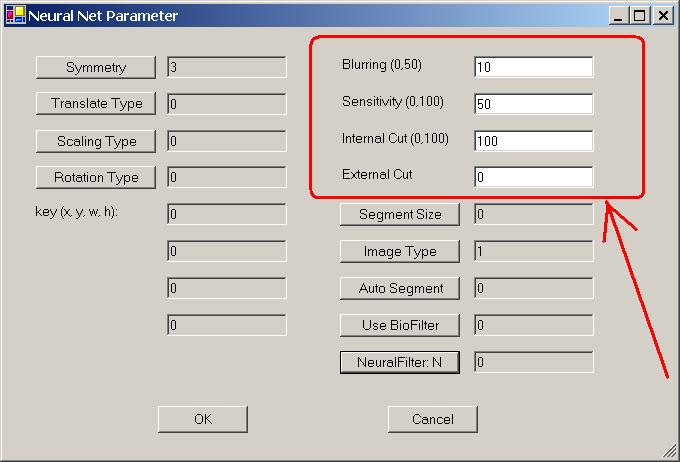
Figure 14.2 Setting the Neural Net Parameters.
In Figure 14.2:
-
The first four parameters are set through buttons: Symmetry, Translation Type, Scaling Type, and Rotation Type.
-
The next four parameters, (x, y, w, h), are set in the main form.
-
The next four parameters are set via text boxes: Blurring, Sensitivity, Internal Cut (Internal Threshold), and External Cut (Threshold).
-
The last five parameters are set through buttons: Segment Size, Image Type, Auto Segment, Use BioFilter, Use Neural Filter.
We will explain these parameters in a later chapter.

[Home][About][1. Introduction][2. Overview][3. GUI][4. Image Signatures][5. Unsupervised Filters][6. Results & Analysis][7. BioFilters][8. NeuralFilters][9. Duplicated Documents][10. Face Recognition][11. Auto Part Recognition][12. Dynamic Library][13. NeuralNet Filter][14. Segment Variation][15. TV Advertisements][16. Counting & Tracking][17. Image PreProcessing][18. Image Processing][19. Batch Job][20. Parameters][21. Input Option][22. Application Developers][23. Reference Manual][24. Support Services][25. Readme.txt]
Copyright (c) 1998 - 2006 Attrasoft, Inc. All rights reserved.